ADHD Clock Guide: 7 Types of Clocks and Timers for Time Blindness
Have you ever looked at the clock, thought you had plenty of time, and somehow ended up running late anyway?
Or maybe you’ve sat down to work on something “for just five minutes,” only to realize an hour has disappeared.
If that sounds familiar, you may have come across the idea of an ADHD clock.
But what exactly is an ADHD clock, and can it really help with time blindness?
The interesting thing is that there isn’t just one type.
Some ADHD-friendly clocks show time passing visually. Others count down to a deadline, remind you to switch activities, or help you wake up in the morning.
And some are surprisingly simple.
I’ve experimented with different planning systems, visual progress trackers, reminders, and ways of making everyday routines feel more manageable. One thing I keep coming back to is how useful it can be to make information visible instead of expecting myself to remember everything.
That’s the idea I want to explore here.
Rather than recommending another gadget simply because it’s marketed for ADHD, let’s look at seven types of clocks and timers, what each one actually does, and how to choose something that fits your life.
You’ll also find free online ADHD clock options, practical setup ideas, and tips for trying a visual timer without buying anything.
What Is an ADHD Clock?
An ADHD clock is an informal term for a clock, timer, or alarm designed or used to help with time awareness, focus, routines, and transitions.
It isn’t a specific medical device or a single product category.
People searching for an ADHD clock may be looking for:
- A visual timer that shows time disappearing.
- A large analog clock that’s easy to see.
- A digital countdown timer for work or studying.
- An alarm clock that makes waking up easier.
- A clock app with reminders or focus sessions.
- A wall clock that keeps time visible throughout the day.
The best choice depends on what you’re struggling with.
For example, someone who regularly underestimates how long getting ready takes might benefit from a visual countdown timer.
Someone who forgets to check the time while working may prefer a clock that’s always visible.
And someone who struggles to get out of bed probably needs an entirely different solution.
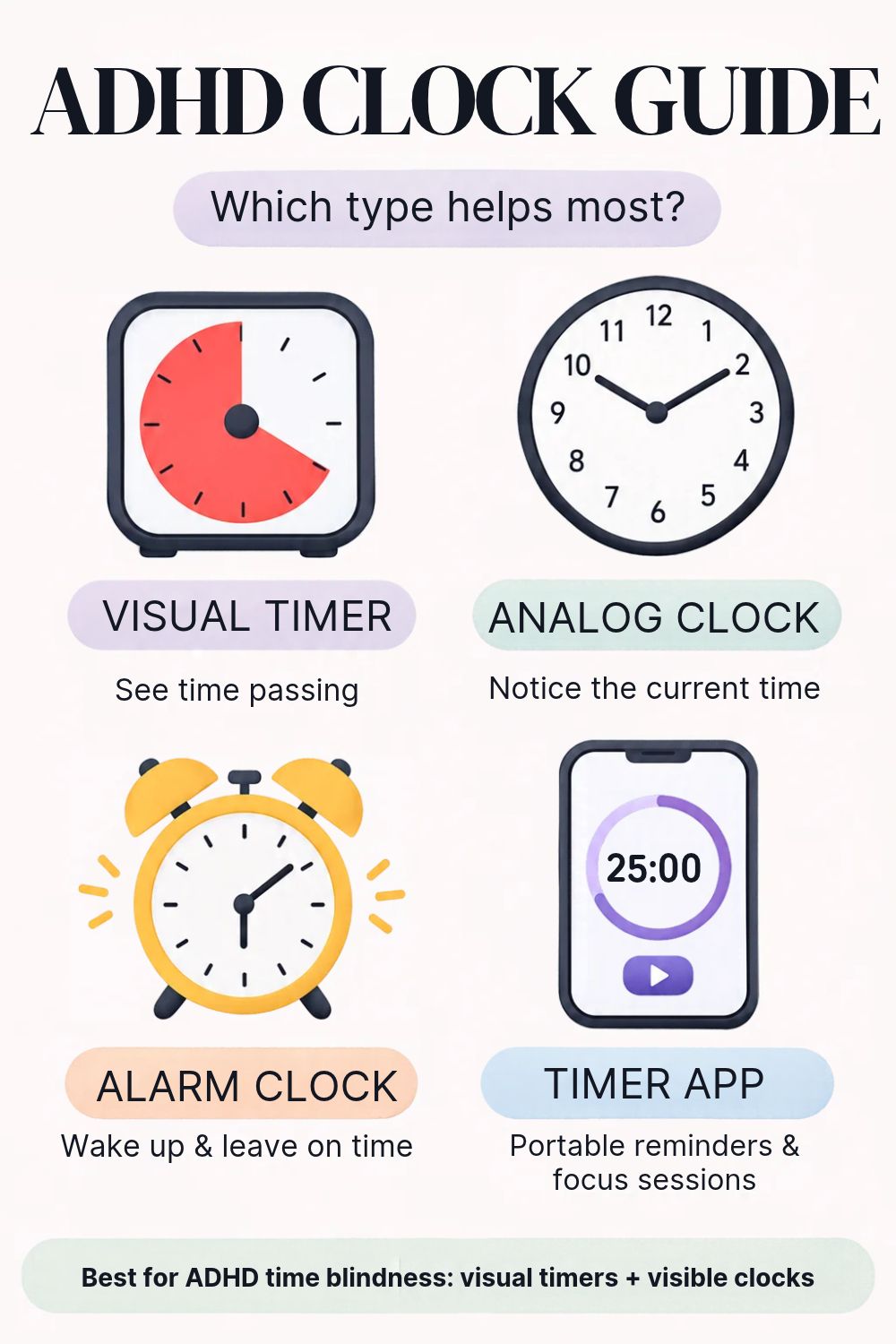
ADHD Clock Types at a Glance
| Clock type | Best for | Phone required? |
|---|---|---|
| Visual countdown clock | Seeing how much time is left | No |
| Large analog clock | Keeping track of the current time | No |
| Digital countdown timer | Short, focused tasks | No |
| Pomodoro timer | Work and study sessions | Depends |
| ADHD alarm clock | Waking up and morning routines | No |
| Visual wall clock | Time awareness at home or work | No |
| ADHD clock app | Portable timers and reminders | Yes or browser |
Quick recommendation: If you’re not sure where to begin, try a free visual countdown timer online before buying a physical device.
1. Visual Countdown Clock — Best for Seeing Time Pass
Best for: Time blindness, transitions, getting ready, timed activities
One of the most recognizable ADHD-friendly clock designs is the visual countdown timer.
Instead of displaying only numbers, it shows a colored section that gradually disappears as time passes.
For example, you might set the timer for 30 minutes.
At the beginning, a large colored area represents those 30 minutes.
As the countdown continues, the colored section shrinks.
You can glance at the clock and see how much of your time remains without calculating the difference between two times.
Why it may help
Some people find it difficult to estimate how much time has passed or how much time they have left.
A visual clock provides an external reference.
It doesn’t require you to constantly remember to check the time or calculate how many minutes remain.
Example: Time Timer
Time Timer is a well-known example of a visual countdown clock.
Its signature design uses a colored disk to represent the remaining time.
The disk gradually disappears as the timer runs.
Several physical models are designed to operate without distracting ticking sounds.
Try it for:
- Getting ready in the morning.
- Completing a household task.
- Taking a timed break.
- Preparing to leave the house.
- Setting a limit for one activity.
Potential downside
A visual timer only helps if you can see it.
If you put it behind your laptop or forget to start it, it may not change much about your routine.
My suggestion: Place it directly in your field of vision, and start with a familiar 10- or 15-minute activity.
2. Large Analog Clock — Best for Everyday Time Awareness
Best for: Home offices, kitchens, visible time reminders
An ordinary analog clock might not seem like an ADHD tool.
But sometimes the simplest solution is to make the current time easier to notice.
A large analog clock uses hands moving around a fixed face.
Some people find this visual representation more intuitive than a digital display.
For example, you can see how close the minute hand is to the top of the hour.
Why it may work
A wall clock can remain visible even when your phone is in another room.
You don’t need to open an app, unlock a screen, or navigate notifications.
That can be particularly helpful if checking your phone often turns into a distraction.
What to look for
Choose a clock with:
- Large, readable numbers.
- Clear contrast between the hands and background.
- Minimal visual clutter.
- A quiet or silent movement if ticking bothers you.
- A size that’s easy to see from your usual workspace.
Potential downside
An analog clock tells you the current time, but doesn’t necessarily make deadlines easier to manage.
If your problem is understanding how much time remains, a visual countdown timer may be more useful.
My suggestion: Try placing an inexpensive analog clock where you regularly lose track of time.
3. Digital Countdown Timer — Best for Short Tasks
Best for: Cleaning, cooking, quick work sessions, getting started
A basic digital countdown timer can be surprisingly useful.
You don’t necessarily need a product specifically marketed as an ADHD timer.
A simple device that counts down from 10 minutes may be enough.
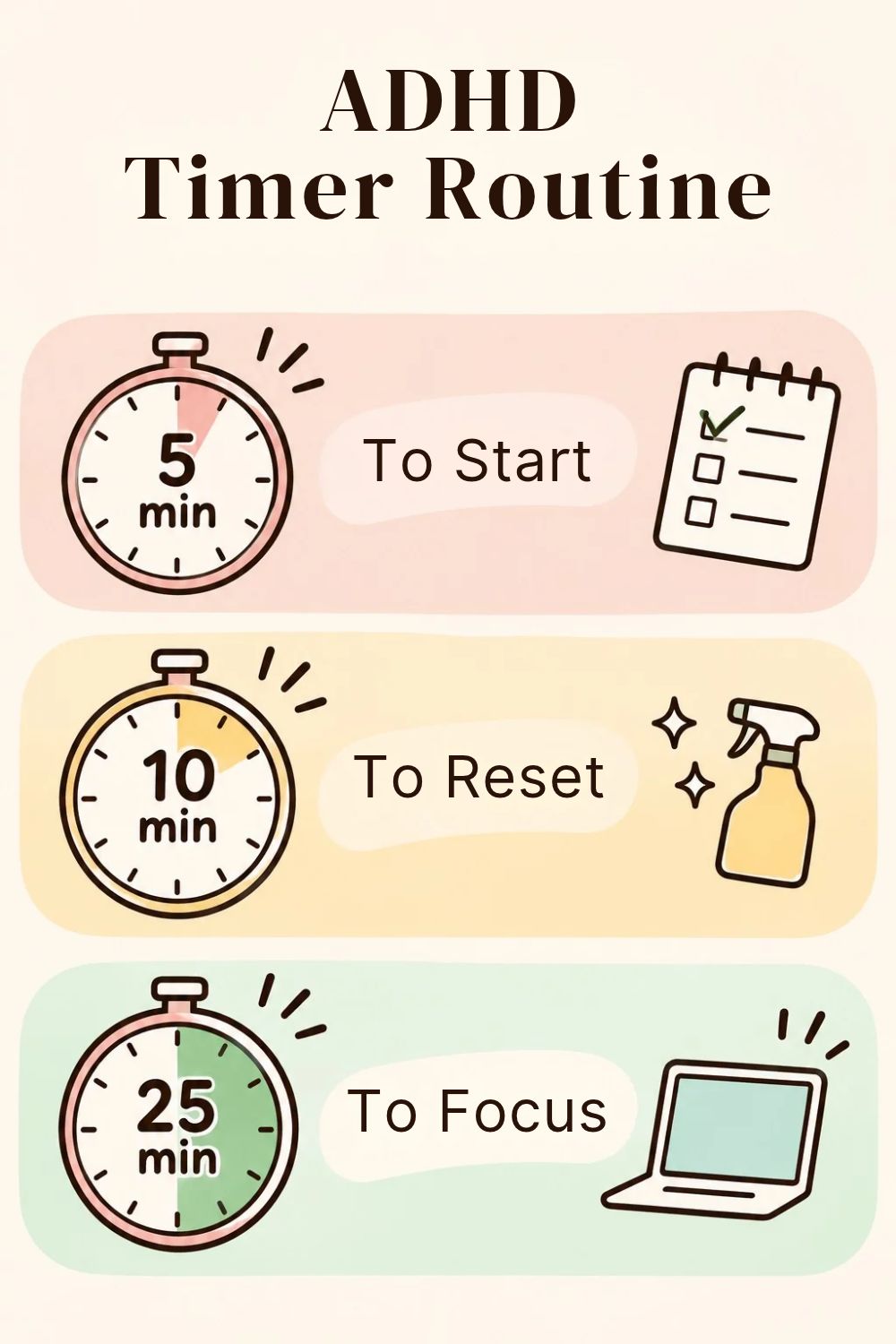
Try the 10-minute start
Imagine you’ve been avoiding cleaning your desk.
Instead of telling yourself to finish the entire task, set a timer for ten minutes.
Your goal becomes:
“Work on the desk until the timer ends.”
You can stop when the time is up or choose to continue.
The timer creates a smaller, more approachable commitment.
What to look for
- Easy-to-read display.
- Simple controls.
- Adjustable volume or silent alerts.
- Quick-start buttons.
- A clear end-of-time signal.
Potential downside
A digital timer shows numbers, but doesn’t always communicate the passage of time as clearly as a shrinking visual disk.
If you’re especially interested in visual time awareness, compare both styles.
4. Pomodoro Clock — Best for Focus and Study Sessions
Best for: Working from home, studying, writing, repetitive tasks
A Pomodoro timer divides work into focused sessions and breaks.
The traditional method uses:
- 25 minutes of work.
- 5 minutes of rest.
- A longer break after several cycles.
But there’s no rule that you must begin with 25 minutes.
For some people, five or ten minutes is a more approachable starting point.
An ADHD-friendly variation
Try this:
- Choose one specific task.
- Set a timer for ten minutes.
- Work on only that task.
- Take a short break.
- Decide whether to repeat.
For example, “write the article” might be too broad.
“Draft the introduction for ten minutes” creates a clearer starting point.
What makes a good Pomodoro clock?
Look for simple session controls, a visible countdown, optional break reminders, and an interface that doesn’t create more distractions.
Potential downside
Some people find strict timers stressful, particularly when they become deeply engaged in a task.
You don’t have to interrupt productive work simply because a preset interval has ended.
Experiment with the timing instead of treating it as a rigid rule.
5. ADHD Alarm Clock — Best for Waking Up and Morning Routines
Best for: Getting out of bed, morning transitions, remembering departure times
An ADHD alarm clock serves a different purpose from a focus timer.
Its main job is to get your attention at a particular time.
Depending on your needs, useful features might include:
- Gradually increasing light.
- Loud or adjustable alarm sounds.
- Vibration or bed-shaker accessories.
- Multiple alarm settings.
- A display that’s easy to read.
Which alarm clock should you choose?
If loud noises feel unpleasant, a gradual light alarm may be more comfortable.
If you regularly sleep through ordinary alarms, a stronger alert or vibration may be useful.
If you wake up but struggle to begin your routine, a separate visual countdown timer might help with the next step.
A simple morning setup
Instead of relying on one alarm to do everything, consider using:
Alarm 1: Wake up.
Visual timer: Get dressed and complete your morning routine.
Alarm 2: Start getting ready to leave.
This gives each tool a clear purpose.
Potential downside
More alarms aren’t always better.
If you become accustomed to dismissing repeated notifications, adding ten more alerts may only create extra noise.
Start with a small number of meaningful reminders.
6. Visual Wall Clock — Best for Shared Spaces and Routines
Best for: Kitchens, classrooms, home offices, family routines
A visual wall clock is useful when you want the time to remain visible without checking a device.
Some use large analog faces.
Others use colored countdown sections, illuminated displays, or special visual scheduling systems.
How it may help
Imagine you’re working in your home office.
You want to finish your current task before lunch, but you frequently forget to check the time.
A large clock positioned near your monitor may provide a more consistent reminder than a phone hidden in your bag.
For shared spaces, a visual countdown can also help communicate how much time is left before an activity changes.
What to look for
- Visibility from across the room.
- A clear display.
- Low visual clutter.
- Quiet operation if needed.
- Easy setup.
Potential downside
A wall clock is less portable than a timer or app.
It may be useful for a particular room but not for managing your day when you’re away from home.
7. ADHD Clock App — Best Free and Portable Option
Best for: Trying visual timers, studying, flexible routines, travel
If you’re curious about visual timers but aren’t ready to buy one, an online ADHD clock is a great place to start.
Some free browser-based timers display a shrinking circle, while others offer traditional countdowns or Pomodoro sessions.
Free visual clock: VisualTimer.com
Website: https://visualtimer.com/
VisualTimer.com offers a browser-based countdown timer with a colored circular display.
You can select a duration, start the timer, and watch the colored area shrink.
It also offers fullscreen mode, making the countdown more visible.
You don’t need to create an account to use the basic online timer.
Time Timer App
Website: https://www.timetimer.com/
Time Timer also offers a digital app.
Its free version includes core timer functionality, while additional organization and advanced timer features require Premium.
Which should you try?
If you want something immediate and simple, begin with a browser-based timer.
If you want saved timers and additional customization, a dedicated app may be useful.
Potential downside
Using a timer on your phone can introduce distractions.
If you frequently open social media when you pick up your phone, a physical timer may be a better fit.
Which ADHD Clock Is Best for Adults?
There isn’t a universal best ADHD clock.
Instead, match the tool to your specific difficulty.
| If you struggle with… | Consider… |
|---|---|
| Losing track of time while working | Large visible analog clock |
| Underestimating how long tasks take | Visual countdown timer |
| Starting overwhelming tasks | Simple 5–10-minute timer |
| Staying focused while studying | Pomodoro timer |
| Getting out of bed | Alarm clock with suitable alerts |
| Switching between activities | Visual countdown clock |
| Remembering when to leave | Scheduled alarm plus visual timer |
| Wanting to try a timer for free | Online visual clock |
The goal is not to buy the most advanced clock. It’s to find the type of time reminder you’ll actually notice and use.
ADHD Time Blindness: Why Seeing Time May Help
Time blindness is an informal term often used to describe difficulty noticing, estimating, or managing time.
It can involve experiences such as:
- Underestimating how long a task will take.
- Becoming absorbed in an activity.
- Forgetting to check the clock.
- Having difficulty preparing for transitions.
- Feeling surprised by how much time has passed.
Research has identified differences in several aspects of time perception among people with ADHD.
However, time perception varies between individuals, and not everyone with ADHD experiences the same difficulties.
What does a visual clock change?
A traditional clock answers:
“What time is it?”
A countdown timer answers:
“How much time do I have left?”
A visual countdown adds another layer:
“What does that remaining time look like?”
This doesn’t mean visual timers are a proven standalone treatment for ADHD.
But they can be a practical external support to experiment with, especially when you want a clearer sense of time passing.
How to Use an ADHD Clock Without Turning It Into Another Chore
This is where I think a lot of productivity advice becomes unnecessarily complicated.
You don’t need a new timer for every part of your life.
You don’t need to create a perfect schedule.
And you certainly don’t need to turn every relaxing activity into a timed performance.
Instead, try one small experiment.
Step 1: Choose One Situation
Pick a moment when time management regularly becomes frustrating.
For example:
- Getting ready in the morning.
- Starting work.
- Cleaning the kitchen.
- Taking a break.
- Preparing to leave home.
Step 2: Choose a Realistic Time
If you’re not sure how long something usually takes, make a rough estimate.
You can adjust it later.
Step 3: Make the Clock Visible
Place the device or browser timer where you can easily see it.
Avoid hiding it behind other objects or windows.
Step 4: Try It for a Few Days
Notice what happens.
Do you check the time more naturally?
Does the countdown help you begin?
Do you find the timer reassuring, distracting, or stressful?
Step 5: Keep Only What Helps
You don’t need to continue using a timer simply because other people recommend it.
If the device creates more frustration than support, try a different type or use it for a different purpose.
5 Everyday Ways to Use an ADHD Visual Clock
1. The 10-Minute Cleaning Reset
Set a ten-minute countdown.
Choose one small cleaning task, such as clearing a desk or putting dishes away.
Stop or reassess when the timer ends.
2. The Leaving-the-House Countdown
Set a visual timer for the amount of time you realistically need to finish getting ready.
Use a separate reminder for the actual departure time.
3. The Five-Minute Task Starter
If a task feels overwhelming, commit to just five minutes.
The goal is getting started, not finishing everything.
4. The Focus Session
Set a 15- or 25-minute timer for one clearly defined activity.
Take a break afterward if needed.
5. The Transition Reminder
Use a countdown before switching activities.
For example, set ten minutes before you need to leave for an appointment, then use a clear departure alarm.
These are experiments, not strict rules. Adjust them to your own needs.
ADHD Clock With or Without Ticking: Which Is Better?
Some people enjoy the steady sound of a traditional clock.
Others find ticking distracting, irritating, or overstimulating.
Neither preference is wrong.
If repetitive sound bothers you, look for a clock described as silent, non-ticking, or sweep movement.
For a physical visual timer, check whether the countdown mechanism is quiet and whether the end alarm can be turned off or adjusted.
It’s also worth distinguishing between:
- Ticking during the countdown: Continuous mechanical sound.
- End-of-time alert: A sound when the timer finishes.
A device can be silent while counting down but still have an audible alarm at the end.
Do You Need an Expensive ADHD Clock?
Not necessarily.
Before purchasing anything, try using a free online timer for one week.
That can help you learn whether you prefer a shrinking visual disk, a traditional digital countdown, or a simple alarm.
If the visual countdown genuinely improves your routine, a physical device may be worth considering.
A dedicated timer can be useful because it doesn’t require opening your phone.
But there’s no need to pay for features you won’t use.
Frequently Asked Questions About ADHD Clocks
What is an ADHD clock?
An ADHD clock is an informal name for a clock, timer, or alarm used to support time awareness, focus, and daily routines. Common examples include visual countdown timers, analog clocks, digital timers, and alarm clocks.
What is the best ADHD clock for adults?
A visual countdown clock may suit adults who struggle to estimate remaining time. A large analog clock may help keep the current time visible, while alarms are more useful for reminders and waking up.
Is there a free ADHD clock online?
Yes. Websites such as VisualTimer.com provide free browser-based countdown timers with visual displays. You can also use basic timer functions on many phones and computers.
What is an ADHD visual clock?
An ADHD visual clock usually refers to a timer that represents remaining time through a shrinking colored area. This provides a visual way to understand the countdown.
Can an ADHD clock help with time blindness?
A clock or visual timer may help some people externalize time and create more noticeable reminders. However, there is limited direct evidence that any particular ADHD clock reliably improves ADHD symptoms, and individual experiences vary.
What’s the difference between an ADHD timer and an ADHD clock?
A clock typically displays the current time. A timer measures a chosen interval. Some visual clocks combine elements of both, but their main purpose is often to make time remaining easier to notice.
Are ADHD clocks only for children?
No. Visual clocks, timers, and reminders can be used by children, students, and adults. Choose features based on the user’s needs rather than the age group used in the product’s marketing.
Is an analog clock better for ADHD than a digital clock?
Not universally. Some people prefer analog clocks because the moving hands visually represent time. Others find digital displays clearer and easier to read.
What is the best ADHD alarm clock?
That depends on the difficulty you’re addressing. A gradual light alarm may suit someone who dislikes abrupt noises, while stronger sound or vibration may be useful for someone who regularly misses ordinary alarms.
Can I use an ADHD clock app instead of buying a timer?
Yes. Browser-based timers and mobile apps can provide useful countdown and reminder functions. A physical timer may be preferable if your phone is a frequent source of distraction.
Is there an ADHD clock test?
There is no single clock test that can diagnose ADHD. Clinical assessment considers a broader pattern of symptoms, history, and functional difficulties. A simple timed activity can help you observe your own time estimates, but it cannot determine whether you have ADHD.
What is the ADHD internal clock?
The phrase describes internal time perception, including how people estimate duration and notice time passing. Research suggests ADHD can be associated with differences in timing processes, but these differences vary and aren’t diagnostic on their own.
Final Thoughts: Make Time Easier to See
An ADHD clock doesn’t have to be complicated, expensive, or specifically marketed as a neurodivergent productivity gadget.
Sometimes a large analog clock is enough.
Sometimes a visual countdown makes an activity feel easier to understand.
And sometimes the most helpful tool is simply a reminder that tells you when it’s time to leave.
I think the most useful approach is to start with the everyday difficulty you’re trying to solve, not the product you want to buy.
Try one type of timer.
Give it a realistic chance.
And keep it only if it makes your routine feel easier.
The point isn’t to control every minute of your day. It’s to make time work a little better for you.