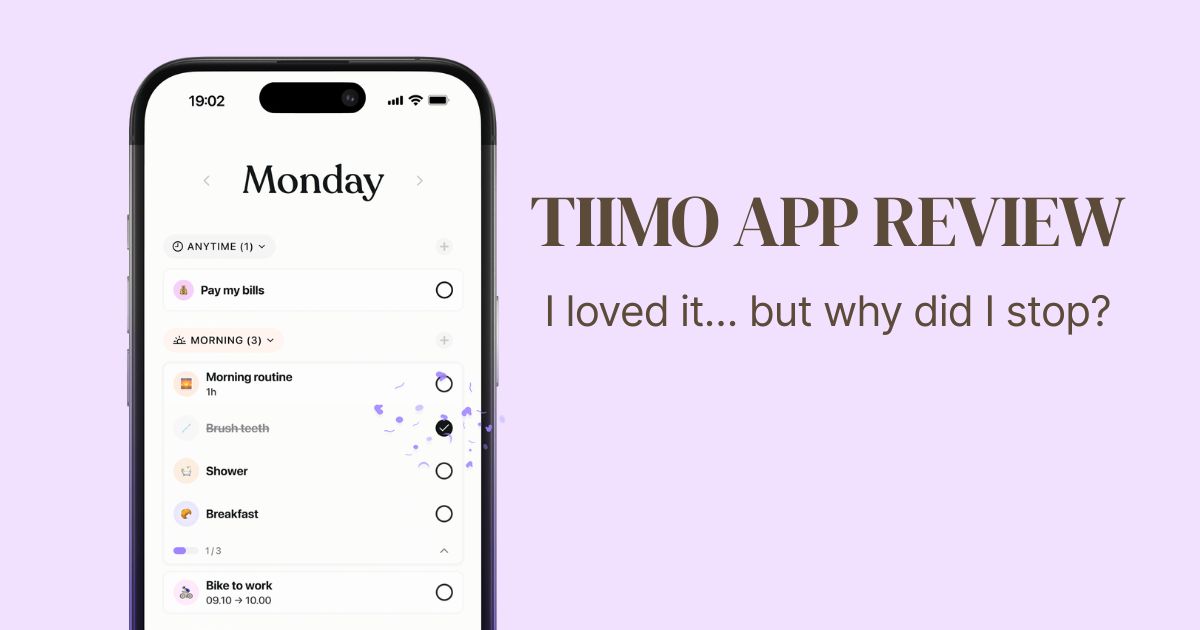
Tiimo App Review (2026): I Loved This ADHD Planner… So Why Did I Stop Using It?
My honest experience with Tiimo, the visual ADHD planner that made routines fun, helped me start tasks, and reminded me that productivity isn’t everything.
Have you ever downloaded a new productivity app and thought, This is it. This is finally the system that’s going to change everything?
Because I definitely have.
I was actively looking for something that could help me stay consistent with my routines and everyday tasks. I already knew that playful motivation works well for me, so when I discovered Tiimo, it seemed like exactly the kind of tool I’d enjoy.
A colorful visual planner, routines, little steps, and a way to see my progress? Yes, please!
And the funny thing is, I genuinely loved using it.
Until I didn’t.
Not because Tiimo was bad. In fact, I still think it’s one of the more thoughtfully designed ADHD planning apps I’ve tried.
It’s just that my relationship with routines, productivity, and consistency is a little more complicated than downloading another app.
So here’s my honest Tiimo app review: what I loved, how I actually used it, why I eventually stopped, and whether I’d recommend it.
What Is Tiimo?
Tiimo is a visual daily planner designed to make everyday tasks, routines, and time management easier to navigate.
It’s particularly known for its ADHD- and autism-friendly approach, although you don’t need to be neurodivergent to use it.
Rather than presenting your entire day as an intimidating list of unfinished tasks, Tiimo helps you create a more visual picture of what you want to do.
Its features include:
- Visual daily scheduling and routines
- Breaking tasks into smaller, manageable steps
- Visual timers and focus tools
- Progress tracking
- Reminders and customizable planning tools
- AI-assisted planning features
- Calendar and web planning options
Some features require Tiimo Pro, and availability varies by platform.
But what interested me most wasn’t the list of features.
It was the idea that planning could actually feel enjoyable.
My First Impression: I Absolutely Loved Setting It Up
I’m not exaggerating when I say that the setup was one of my favorite parts.
I love discovering systems that turn complicated things into something visual, manageable, and even a little playful.
And Tiimo did exactly that.
I loved how it helped break larger tasks into smaller steps.
I loved seeing where I was with my tasks.
And I loved that it supported routines rather than just giving me another endless to-do list.
There was something genuinely motivating about seeing the structure of my day in a way that felt approachable.
It made me want to participate.
And if you struggle with getting started, that feeling can be surprisingly valuable.
How I Actually Used Tiimo
One thing I really appreciated was that Tiimo didn’t have to be only about work or traditional productivity.
I used it to follow personal habits that support my mental well-being.
Things like:
- Going for walks
- Moving my body
- Writing in my journal
- Drinking enough water
- Keeping up with little routines that are important to me
These weren’t random productivity goals.
They were habits I personally wanted to make more space for because I know they help me feel better.
And I liked that I could build a system around my own needs instead of following someone else’s idea of a perfect routine.
For me, the appeal of Tiimo was that it made taking care of myself feel a little more approachable.
Not every useful task has to be about work, achievement, or getting ahead.
Sometimes the important thing on your schedule is simply going outside for a walk.
Did Tiimo Actually Help Me Get Things Done?
Yes!
And I think that’s important to say.
Tiimo genuinely helped me get started with tasks.
Breaking things into smaller steps made them feel easier to approach, and the visual feedback made the experience more enjoyable.
I respond well to playful motivation, so having a system that made progress visible was appealing.
But I also noticed something interesting happening in my head.
Even while I enjoyed checking off tasks and seeing my progress, I sometimes had this little voice asking:
Am I just congratulating myself for doing things I should already be doing?
Which, when I think about it, is a pretty unfair way to talk to myself.
After all, if a tool helps you do something that was difficult before, why shouldn’t that count as a win?
Still, that uncomfortable feeling was there.
And I think it says something about the complicated relationship many of us have with productivity.
We’re told to celebrate small wins, but sometimes we’re also carrying the belief that those wins aren’t impressive enough.
I’m still learning how to navigate that.
One of the things I appreciated most about Tiimo was how it helped me get started with tasks. If you’ve ever known exactly what you needed to do but still couldn’t bring yourself to begin, you might recognize some of the experiences I share in Living With ADHD as an Adult.
So Why Did I Stop Using Tiimo?
Here’s where things get a little messy.
My phone is already chaotic.
There are so many apps, notifications, things competing for my attention, and little digital distractions everywhere.
And even though Tiimo is designed to make life easier, it eventually became one more app on my phone.
One more thing to open.
One more thing to remember.
One more set of notifications.
At first, the experience was exciting. But eventually, it became repetitive, like so many other things I’ve tried.
And I gradually stopped using it.
The interesting part is that this isn’t something that only happens with Tiimo.
I have a journal that I genuinely love.
I know it’s there. I know journaling can be helpful for me. I want to use it.
And yet, sometimes I completely forget it exists in my daily routine.
Not because I stopped caring about it.
I just don’t always remember to come back to it.
That’s why I don’t think it’s fair to blame Tiimo for the fact that I stopped using it.
An app can be beautifully designed, genuinely helpful, and still become difficult to maintain as a habit.
For me, the challenge wasn’t only organizing my tasks.
It was staying connected to the system over time.
I’ve realized that finding the right app is only one part of the puzzle. Sometimes the bigger challenge is creating a system that’s easy enough to maintain, even on low-energy days. That’s something I explore in my guide to ADHD organization strategies that actually make everyday life easier.
What I’m Doing Instead of Using Another Productivity App
Right now, I’m approaching things a little differently.
I’m getting professional psychological support, and I’m also learning to make everyday tasks as easy as possible for myself.
Instead of starting with the hardest thing on my list, I often begin with whatever feels most manageable.
Then I try to work my way toward the more difficult tasks.
Sometimes I get there.
Sometimes I don’t.
And sometimes my husband is the one who reminds me that a particular task really can’t wait any longer.
It’s not a perfectly optimized productivity system.
But it’s real life.
I’m also trying to be more understanding with myself about the things I postpone, forget, or simply don’t have the capacity to do right now.
That doesn’t mean every responsibility disappears.
It means I’m learning to approach my responsibilities without turning every unfinished task into a judgment about myself.
Because here’s something I really want to remember:
My value as a person isn’t determined by how many tasks I complete.
And I don’t want a productivity app—even one I genuinely like—to become another way of measuring whether I’ve done enough to deserve feeling good about myself.
What I Think Tiimo Gets Right About ADHD
Despite the fact that I stopped using it, I still have a very positive impression of Tiimo.
What stood out to me was that its design seemed to understand some of the everyday difficulties associated with ADHD.
Not just forgetting things, but also:
- Struggling to get started
- Feeling overwhelmed by larger tasks
- Needing external structure
- Benefiting from visible progress
- Finding motivation through engaging, playful experiences
- Having difficulty staying consistent with routines
Of course, ADHD experiences vary significantly from person to person.
Not everyone will respond to visual planners in the same way.
But I really appreciate that Tiimo seems to take these challenges seriously rather than simply presenting another productivity checklist.
And I think that makes it worth exploring.
Is Tiimo Free? Free vs. Pro
Tiimo offers a free mobile version alongside a paid Pro subscription.
The free version is a useful starting point for exploring whether its visual planning approach works for you.
Tiimo Pro provides access to additional features, including expanded planning and AI tools, customization options, and web access.
There are monthly and annual subscription options, and an eligible annual subscription may include a seven-day free trial.
Exact prices and features can vary by region, device, and subscription plan.
You can check the current details on the official Tiimo website.
My advice before paying for Tiimo
Since I personally know how easy it is to fall in love with a new planning system, I’d suggest starting small.
Don’t immediately assume that because you enjoy the setup, you’ll want to use the app every day for the next year.
Test it with a few routines first.
See how it feels once the initial excitement wears off.
And if you’re considering an annual subscription, make sure you’ve checked the renewal terms.
Can You Use Tiimo on Desktop?
Yes. Tiimo offers a web planner, although web access is tied to its Pro offering.
This could be especially useful if, like me, your phone already feels a little overcrowded.
Planning on a larger screen might be a better fit if you spend much of your day working at a computer.
I wouldn’t want to claim that desktop planning solves the consistency problem, though.
It simply gives you another way to access your system.
And the best platform is the one you’ll actually remember to use.
Tiimo vs. Structured: Which One Should You Try?
Two names that often come up when looking for visual planning apps are Tiimo and Structured.
Both help people see their day more clearly, but their approaches aren’t identical.
Tiimo places particular emphasis on neurodivergent-friendly planning, routines, and tools that help you break down tasks.
Structured is known for its visual daily timeline and time-blocking approach.
If you’re drawn to playful motivation, routines, and ADHD-oriented support, Tiimo may be particularly appealing.
If you mainly want a clear timeline showing what you’re doing throughout the day, Structured is also worth investigating.
I haven’t done a personal side-by-side test of both apps, so I wouldn’t declare one the winner.
Ultimately, the most helpful app is the one that fits your needs with the least amount of extra effort.
If you’re still exploring your options, I’ve put together a more detailed guide to the best ADHD planner apps for adults, including Tiimo, Structured, Ellie, Sunsama, and other planning tools. It might help you figure out whether you need visual routines, simpler task management, or a completely different approach to planning.
Is Tiimo Worth It for ADHD?
I think Tiimo is absolutely worth trying.
And I say that even though I eventually stopped using it.
It helped me get started with tasks, made routines more enjoyable, and gave me a visual system that felt genuinely supportive.
I can especially imagine it being useful for someone who enjoys visual feedback and benefits from breaking activities into smaller steps.
But I’d encourage you to think beyond whether you like the interface.
Ask yourself whether you want another app to maintain.
Whether reminders are helpful or overwhelming.
Whether visual planning makes your day easier.
And whether you’re comfortable experimenting without expecting the app to change your entire life.
Because a useful tool doesn’t have to solve every problem to be worth trying.
Of course, digital planning isn’t the only option. If another app feels like too much to maintain, a physical planner might be worth considering. I’ve also explored different styles in my guide to the best ADHD planners for adults on Amazon, from simple daily layouts to more structured planning systems.
Would I Use Tiimo Again?
Actually, yes.
Writing about my experience has made me think that I might download it again.
I still like the idea, and I remember enjoying it.
But if I return to Tiimo, I’d like to approach it with a different mindset.
I’m currently learning to be more realistic about how many tasks I take on and how much I expect from myself.
I don’t want to use a planner to fill every available moment with another responsibility.
I’d rather use it to make room for the things that genuinely matter to me.
Maybe that’s a walk.
Maybe it’s working on something I’ve been avoiding.
Maybe it’s remembering to drink water.
Or maybe it’s making sure I have some time to enjoy my afternoon without feeling guilty.
I think that’s a much healthier reason to use a planning tool.
Frequently Asked Questions
Is Tiimo good for adults with ADHD?
Tiimo is designed with neurodivergent users in mind and includes visual schedules, routines, timers, and task-planning tools. It may be helpful for adults with ADHD who benefit from external structure and visual feedback.
Is Tiimo free?
Tiimo has a free mobile version, while advanced features require a Pro subscription.
Is Tiimo worth paying for?
That depends on how consistently you’ll use the additional features. I’d recommend trying the free version or an eligible trial before committing to a longer subscription.
Does Tiimo work on Android?
Yes. Tiimo is available for supported Android devices through Google Play.
Is there a Tiimo desktop version?
Tiimo offers a web planner for desktop browsers through its Pro plan. Check the official website for current platform availability.
Why do I keep abandoning ADHD planning apps?
There can be many reasons, including the effort required to maintain a system, changing needs, distractions, or simply finding that a particular approach doesn’t fit your routines.
Abandoning one app doesn’t automatically mean you’ve failed or that another planning method won’t help.
Sometimes you need less complexity, not more features.
Final Thoughts: You Are More Than Your To-Do List
Tiimo is still one of those apps I look back on fondly.
I loved setting it up.
I enjoyed its playful approach to routines.
And yes, it actually helped me get started with tasks.
But eventually, it became another thing to keep track of in an already busy digital world.
I’m not ruling out returning to it. In fact, I might give it another try.
Because I do think the people behind Tiimo understand many of the challenges that can make everyday planning difficult for people with ADHD.
But there’s something even more important I’m taking away from the experience.
The purpose of a planner isn’t to prove how productive you are. It’s to make your life easier to live.
And if your planner helps you take a walk, enjoy a small break, or finally start something that matters to you, that’s already valuable.
You don’t need to complete every task to have a good day.
And you certainly don’t need a perfect routine to deserve one.
Disclaimer: This article shares my personal experience with Tiimo, not a comprehensive hands-on test of every current feature. Product information reflects publicly available details as of October 2026. Pricing, features, and subscription terms may change. This article is not medical advice.