Best ADHD Cleaning Apps for Adults: 5 Tools to Make Chores Easier
Looking for an ADHD cleaning app that makes housework feel less overwhelming? These five apps offer visual cleaning schedules, small tasks, gentle reminders, and even playful rewards.
Have you ever looked around your home, noticed approximately a hundred things that needed cleaning, and somehow ended up doing none of them?
Maybe you started in the kitchen, found something that belonged in the bedroom, walked there, noticed the laundry, and completely forgot what you were originally doing.
Or perhaps you genuinely want a cleaner home, but the thought of creating and maintaining another cleaning schedule feels exhausting.
I can relate to the challenge of finding organizational systems that actually fit the way I work.
Over the years, I’ve experimented with paper planners, productivity apps, timers, visual trackers, and playful ways of organizing my everyday responsibilities.
Many of those experiments happened before I even started recognizing ADHD patterns in myself.
What I’ve learned is that having a system isn’t automatically helpful.
A system only works when it makes the task easier to start, follow, or finish.
And I think this is especially important when it comes to cleaning.
You don’t necessarily need another enormous checklist of everything that should be spotless.
Sometimes, you need an app that tells you what to do first.
Sometimes, you need a timer.
And sometimes, you need the satisfaction of watching your virtual cleaning progress grow.
Let’s explore five ADHD-friendly cleaning apps for adults and how to choose one that fits your home, your energy, and your preferences.
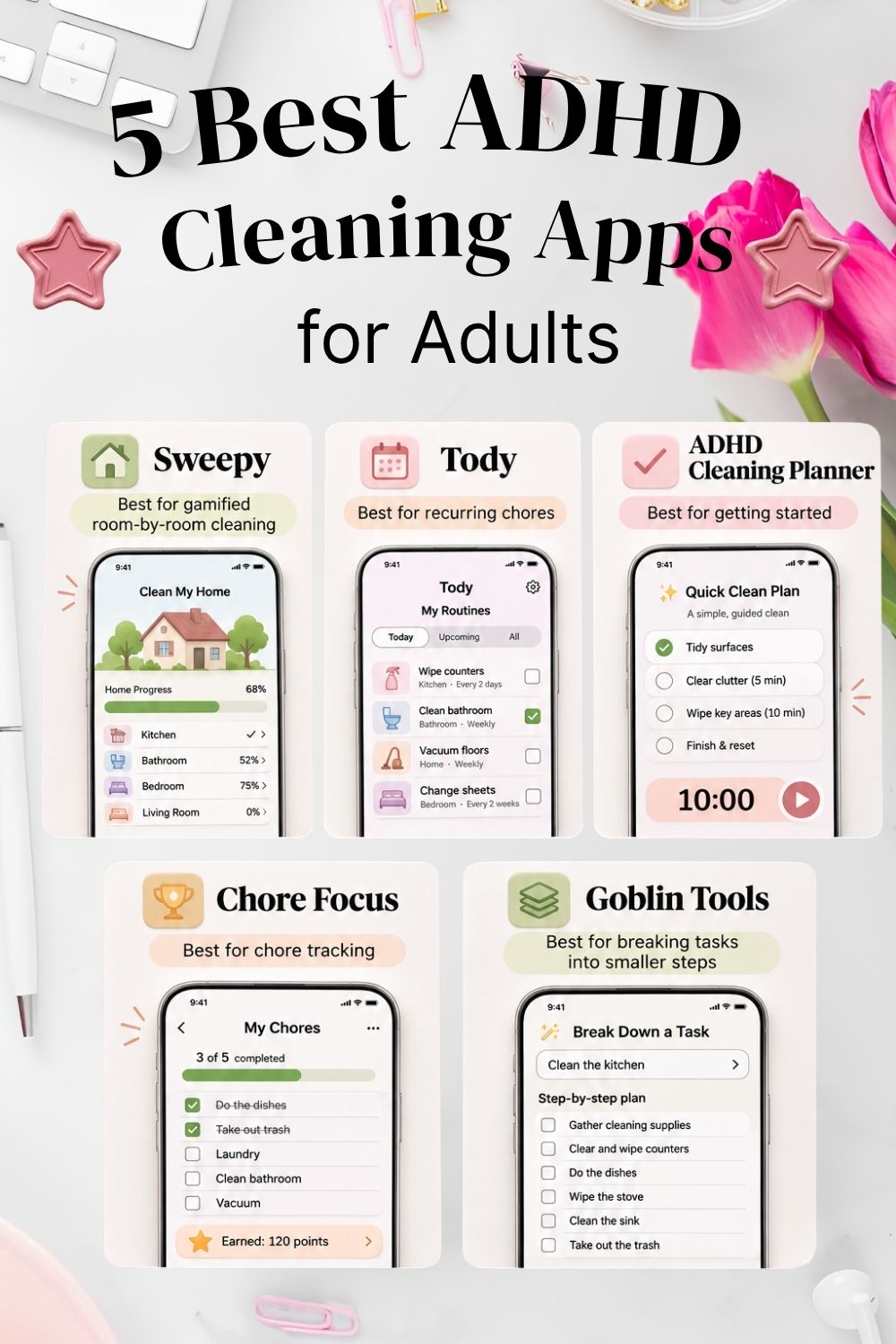
Quick Comparison: Best ADHD Cleaning Apps
| App | Best for | Free option |
|---|---|---|
| Sweepy | Gamified room-by-room cleaning | Yes |
| Tody | Tracking recurring household chores | Yes |
| ADHD Cleaning Planner | Getting started and visual motivation | Yes |
| Chore Focus | Gamified chore tracking and shared responsibilities | Yes |
| Goblin Tools | Breaking overwhelming chores into smaller steps | Free web tools |
Availability, free-plan limits, and premium features can change. Check the linked official websites before downloading or purchasing.
Why Can Cleaning Feel So Difficult With ADHD?
Cleaning involves much more than physically moving objects or wiping surfaces.
You may need to notice what needs doing, decide where to begin, estimate how long it will take, gather supplies, remember what you’re doing, and resist getting distracted by other tasks.
That’s a lot of executive functioning for something that sounds as simple as “clean the kitchen.”
ADHD can affect skills involved in planning, prioritizing, working memory, and task initiation.
For some adults, that can make household chores especially challenging.
The Attention Deficit Disorder Association recommends flexible cleaning routines, visible reminders, and smaller tasks rather than relying entirely on rigid schedules.
This is where a well-designed cleaning app may help.
Instead of remembering every household responsibility, you can move some of the planning outside your head.
But there’s an important catch.
If maintaining your cleaning app becomes another overwhelming chore, it might not be the right tool for you.
1. Sweepy – Best for Gamified Cleaning Motivation
Best for: Adults who enjoy visual progress, small rewards, and organizing their home room by room.
Free option: Yes, with additional premium features.
Sweepy is a household cleaning app that organizes chores by room and helps you track how clean different areas of your home are.
Instead of looking at one massive cleaning checklist, you can focus on individual spaces and the tasks they need.
The app uses visual indicators to show cleanliness levels.
You can also add household members and use gamified features to make progress more engaging.
Why this approach appeals to me
I really like the idea of turning everyday progress into something visible.
It’s one of the reasons I enjoyed gamified focus timers like Forest.
With Forest, watching a virtual tree grow encouraged me to continue working instead of immediately reaching for my phone.
Sweepy uses a different system, but the underlying appeal is similar: completing ordinary tasks creates visible progress.
And I think that could make repetitive household chores more satisfying.
For example, instead of thinking:
“I still have so much cleaning to do.”
You can see that you’ve completed several tasks in the kitchen, even if the rest of the apartment isn’t finished.
What might be less helpful?
The same visual indicators that motivate one person could create pressure for another.
If you find yourself feeling guilty whenever a room’s cleanliness score drops, consider whether that feature is actually helping you.
You don’t need to compete with your house.
My take: Sweepy would be one of my first recommendations to explore if you enjoy gamification and room-by-room organization.
2. Tody – Best for Remembering Recurring Cleaning Tasks
Best for: Adults who regularly forget when something was last cleaned or want to reduce household planning.
Free option: Yes, with optional paid upgrades.
Tody focuses on recurring household chores.
You can organize tasks by room, define how frequently they need attention, and track when they were last completed.
Instead of forcing every activity onto a rigid calendar, the app uses task intervals and visual indicators to help you recognize what needs attention.
Why I find this concept useful
There are household tasks that are easy to notice.
Dirty dishes, for example, are usually right in front of you.
But other responsibilities are less obvious.
When did you last clean the fridge?
When were the bedsheets changed?
Is it time to wipe the kitchen cabinets?
Remembering these details takes mental energy.
I like the idea of an app holding that information for you.
What makes Tody different from Sweepy?
Sweepy emphasizes gamification and room-cleanliness indicators.
Tody puts more emphasis on cleaning frequency, task history, and recurring maintenance.
Both can help you organize chores, but they approach motivation and planning differently.
Tody also offers optional household sharing through paid plans.
What might be less helpful?
Setting up recurring tasks can take some initial effort.
And if you’re already feeling overwhelmed, entering every cleaning responsibility into an app might be the last thing you want to do.
My suggestion would be to start with just one room and a handful of recurring tasks.
My take: Tody looks particularly useful for keeping track of invisible household responsibilities without needing to remember every detail yourself.
3. ADHD Cleaning Planner – Best for Getting Started When You Feel Stuck
Best for: Adults who feel overwhelmed by messy rooms and benefit from guided steps, timers, and visual encouragement.
Free option: Yes.
ADHD Cleaning Planner is designed specifically around common difficulties with starting and organizing household chores.
It includes room-by-room tasks, focus timers, visual progress tracking, and a feature that offers help when you don’t know how to begin.
The app also includes before-and-after photos, timelapse recording, and gamified achievements.
The feature I find most interesting
One of its most appealing ideas is the option to get help when you feel stuck.
Because sometimes the problem isn’t a lack of motivation to have a clean home.
It’s not knowing what to do first.
Imagine opening the app and choosing your kitchen.
Instead of getting a long, overwhelming list, you can focus on a small action.
Maybe you clear the countertop.
Maybe you put five dishes away.
Maybe you spend ten minutes collecting things that don’t belong there.
And that’s enough to create a starting point.
Why visual progress matters
I also like the idea of recording before-and-after photos.
Sometimes we spend time cleaning but barely notice the difference because our attention immediately moves to everything that’s still unfinished.
A photo can help make completed work visible.
The timelapse feature could make the process feel more engaging, too.
What might be less helpful?
You might not enjoy recording yourself or photographing your home.
And that’s completely fine.
A cleaning app shouldn’t require you to use every feature.
My take: This is an interesting option for people who need more help with getting started than with maintaining a detailed cleaning schedule.
4. Chore Focus – Best for Gamified Chore Tracking
Best for: Adults who enjoy points, progress tracking, and organizing chores individually or with other household members.
Free option: Yes, with limits and premium features.
Explore Chore Focus on Google Play
Chore Focus is a chore-management app designed to organize household responsibilities and add playful motivation.
You can group tasks by room, track completed chores, and use rewards and achievements.
The app also offers optional features for households with multiple people.
Why it might be motivating
Sometimes, repetitive tasks don’t offer much immediate satisfaction.
You wash the dishes, and tomorrow there are more dishes.
You clean the floor, and eventually it gets dirty again.
It’s easy to feel like you’re never really finished.
Gamification can provide an additional sense of completion.
You may earn points, build progress, or work toward small digital rewards.
I find this concept appealing because I personally enjoy seeing progress represented visually.
What I would consider before choosing it
The app’s free version has limits, and certain features, including multi-user support and AI-assisted task entry, are premium.
I’d also think about whether the game elements make your experience more enjoyable or simply add more things to manage.
My take: Chore Focus is worth exploring if you want chores to feel more like small missions than a never-ending list of responsibilities.
5. Goblin Tools – Best Free Tool for Breaking Cleaning Tasks Into Smaller Steps
Best for: Adults who know they need to clean but don’t know how to break a task into manageable actions.
Free option: Yes, through its website.
Goblin Tools isn’t specifically a cleaning app.
It’s a collection of tools designed to help people manage everyday tasks, including activities that feel overwhelming.
Its Magic ToDo feature can break a larger task into smaller steps.
For example, you could enter:
“Clean the kitchen.”
The tool can suggest a sequence of smaller actions.
You can also adjust how much detail you want.
Why I think this is useful for ADHD cleaning
One of the biggest challenges with a large task is that it doesn’t always have an obvious starting point.
“Clean the kitchen” sounds simple.
But it might involve:
- Collecting dirty dishes.
- Clearing one countertop.
- Throwing away visible trash.
- Washing or loading dishes.
- Wiping the counter.
- Putting supplies away.
When those steps are separated, the task can feel less intimidating.
I also like that Goblin Tools lets you choose how detailed the breakdown should be.
On some days, you may only need a quick checklist.
On other days, you might want very small, explicit instructions.
What to consider
AI-generated task lists aren’t always perfect.
Some steps may be irrelevant or unnecessarily detailed.
Treat the output as a starting point, not something you must follow exactly.
My take: If your biggest obstacle is deciding where to begin, I would try the free web version of Goblin Tools before paying for a more complicated cleaning system.
Which ADHD Cleaning App Should You Choose?
I wouldn’t recommend downloading all five at once.
Instead, think about what makes cleaning difficult for you.
| If your biggest challenge is… | Consider… |
|---|---|
| Staying motivated through repetitive chores | Sweepy |
| Remembering recurring cleaning responsibilities | Tody |
| Starting when a room feels overwhelming | ADHD Cleaning Planner |
| Enjoying rewards and tracking completed chores | Chore Focus |
| Breaking large tasks into smaller actions | Goblin Tools |
You might also discover that you don’t need a dedicated cleaning app.
Maybe a basic timer and a simple printable checklist already provide enough structure.
And that’s a perfectly reasonable solution.
How to Use an ADHD Cleaning App Without Getting Overwhelmed
I think this is where choosing the right approach matters even more than choosing the right app.
1. Start with one room
Don’t begin by entering your entire house into a new cleaning system.
Choose one space.
Maybe your kitchen, bedroom, or bathroom.
Add just a few tasks you want help remembering or completing.
2. Make the tasks ridiculously specific
Instead of “Clean bathroom,” try:
- Clear the sink.
- Wipe the mirror.
- Replace the towels.
- Empty the trash.
A specific task gives you a clearer starting point.
3. Choose your preferred type of motivation
Would you rather:
- Earn points?
- Watch a progress bar fill up?
- See a room become cleaner?
- Check off individual tasks?
- Use a timer?
- Take a before-and-after photo?
Different interactions can feel motivating to different people.
There isn’t one universally ADHD-friendly design.
4. Create a minimum-effort option
Your cleaning routine should also work on days when you have less energy.
Maybe your usual kitchen reset includes six tasks.
But your minimum version could be:
- Put away five items.
- Throw away visible trash.
- Clear one small surface.
That still counts as progress.
5. Don’t turn missed chores into debt
If you miss a cleaning day, you don’t necessarily need to double your workload tomorrow.
Review what actually needs attention.
Some tasks can wait.
Others might be completed in a shorter version.
Your cleaning app should help you make decisions, not accumulate reasons to feel guilty.
Free ADHD Cleaning Apps: Do You Really Need a Paid Subscription?
Not necessarily.
Several apps in this list offer free starting options.
And the best value depends on the feature you actually need.
Before paying for an ADHD cleaning app, ask yourself:
- Can I manage my basic chores with the free version?
- Do I need automatic schedules?
- Will I realistically use shared household features?
- Are the reminders helpful or distracting?
- Can I customize the tasks?
- Am I paying for something that genuinely solves a problem?
- Will I still want to use this app after the initial excitement?
Personally, I would rather have one simple tool I regularly use than a beautiful collection of paid productivity apps I eventually forget about.
A subscription isn’t automatically better than a free checklist.
What If Cleaning Apps Don’t Work for You?
Sometimes, apps add too much friction.
You open your phone to check a task, see a notification, and suddenly you’re doing something completely unrelated.
Or perhaps the app is so detailed that maintaining it becomes another responsibility.
If that’s happening, try simplifying.
You could use a printed checklist on your fridge.
You could create a reusable cleaning chart with a dry-erase marker.
You could use a short focus timer.
Or you might prefer cleaning alongside someone else, whether in person or through a “clean with me” video.
The important thing is matching the tool to the situation.
If you prefer a more tactile or creative approach, my guide to ADHD routine charts for adults explores different ways to use checklists, stickers, colors, and movable task cards.
And if you just need a simple starting point, read How to Clean With ADHD When You Feel Overwhelmed.
My Favorite Idea: Combine a Cleaning App With a 10-Minute Timer
You don’t need to commit to cleaning your entire home.
Try this instead.
Open your cleaning app and choose one small task.
Set a timer for ten minutes.
Work on that task until the timer ends, or stop earlier if you need to.
Then decide what to do next.
You might continue because you’ve built momentum.
You might switch to another small task.
Or you might be done for the day.
I like this approach because it separates getting started from the pressure to finish everything.
When I used gamified focus timers, one of the things I appreciated was having a clear focus session and a small visual reward.
That structure sometimes helped me reconsider an interruption rather than immediately abandoning what I was doing.
You can bring a similar idea into cleaning without turning it into a race.
If you enjoy experimenting with timers, I’ve also compared ADHD timer apps for visual focus and motivation.
Frequently Asked Questions
What is the best cleaning app for adults with ADHD?
It depends on what you need help with. Sweepy is worth considering for gamified room-by-room cleaning, Tody for recurring chores, ADHD Cleaning Planner for getting started, and Goblin Tools for breaking tasks into smaller steps.
Are there free ADHD cleaning apps?
Yes. Sweepy, Tody, ADHD Cleaning Planner, and Chore Focus have free options, though some features require payment. Goblin Tools provides free web-based task breakdown tools.
Is Sweepy or Tody better for ADHD?
Sweepy may appeal more to people who enjoy gamification and visual room-cleanliness indicators. Tody focuses on remembering recurring chores and tracking cleaning frequencies. Neither is automatically better for every adult with ADHD.
Can a cleaning app help with ADHD task paralysis?
A cleaning app may help some people get started by breaking chores into smaller steps, offering reminders, or providing visual cues. It won’t eliminate every cause of task paralysis, and different people may need different kinds of support.
What is the best ADHD cleaning app for couples?
Tody, Sweepy, and Chore Focus offer household-management features that may help distribute responsibilities. Check each app’s current paid-plan requirements for shared access.
What if I keep ignoring cleaning reminders?
Try reducing the number of reminders or changing the system. A visible checklist, a shorter routine, or a reminder connected to something you already do may be more helpful than frequent notifications.
Is an ADHD cleaning app better than a printable cleaning chart?
Not always. Apps can automate reminders and recurring tasks, while printable charts may be easier to see and use without picking up your phone. The better option is the one you find easiest to maintain.
Final Thoughts: Your Home Doesn’t Need a Perfect Cleaning System
One thing I’ve learned from experimenting with different productivity tools is that the most elaborate system isn’t necessarily the most useful one.
Sometimes, an app makes a big difference.
Sometimes, a tiny checklist works better.
And sometimes, the best thing you can do is choose one small task and forget about the rest for a moment.
What I like about these ADHD cleaning apps is that they offer different ways to approach the same challenge.
Some make progress visible.
Some remember recurring responsibilities for you.
Some turn chores into a game.
And others help you figure out what the first step should be.
You don’t need to build your entire life around a cleaning app. The app should fit into your life.
If a colorful progress bar helps you get started, wonderful.
If a ten-minute timer makes cleaning more approachable, use it.
And if all you manage today is clearing one small surface, that can still be a useful step forward.
Start small, keep it flexible, and make the system your own.
Editorial note: This article combines my personal experience with productivity and focus tools with research into cleaning app features. The individual cleaning apps are not presented as products I have personally tested. Pricing, availability, and features may change.
This content provides general organization ideas and is not a substitute for professional ADHD assessment or treatment.